Do you feel like the old material falls out of your head every time you learn something new? You’re far from alone, and there’s a fix!
MCAT Anki cards bring each fact back right before you’d forget it, so your content review keeps what it covers 🙂
In the video above, Arvind walks through the Anki system that took his MCAT score from a 499 to a 517 in about six weeks.
He recorded it in 2021 on an older Anki, so a few screens look different today. The MCAT Anki steps below follow the current version (26.09).
Free download
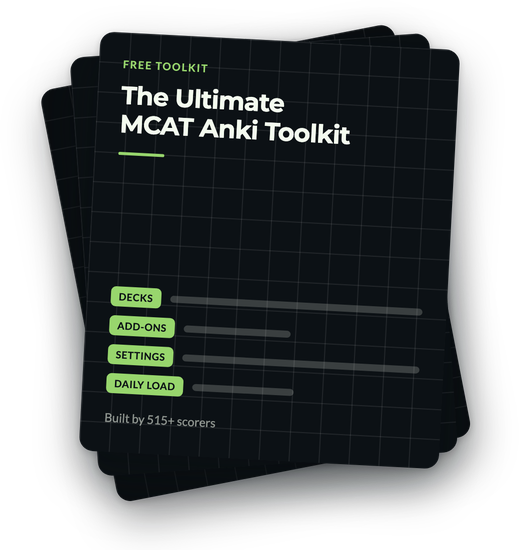
The exact Anki settings a 517 scorer used to lock content into memory.
The Ultimate MCAT Anki Toolkit carries the decks, the extensions, and the rule for what earns a card.
On its way.
Check your inbox in the next minute.
What Is Anki, and Is It Good for the MCAT?
Anki is a free, open-source flashcard program, and it’s good for the MCAT because it runs on two study habits that help you remember, active recall and spaced repetition.
Active recall means pulling the answer out of your own memory. You see “B cells” on the front of a card and say what they do before you flip it.
Rereading your notes about B cells is passive, since the answer is already in front of you.
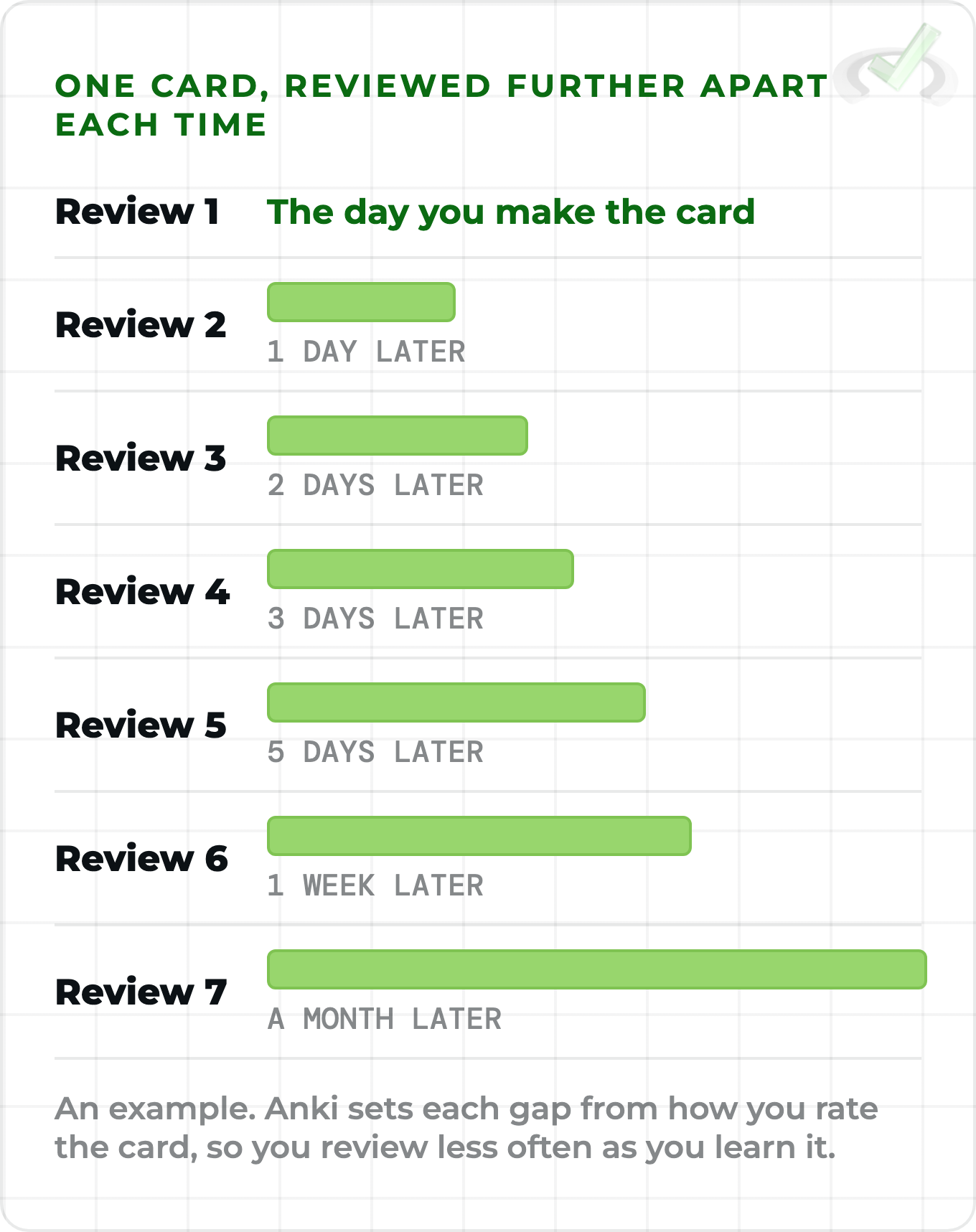
Spaced repetition means seeing each card again at longer and longer gaps. A new card comes back the next day, then a couple of days later, then a week later, and on out to a month as you get it right.
Paper flashcards and a basic Quizlet set don’t space your reviews for you. With Anki, you don’t review every card every day, and you don’t lose the early chapters while you learn new ones!
How to Set Up Anki for the MCAT
Setting up takes about as long as making a coffee :) Here are the steps:
- Download Anki. The computer version is free from apps.ankiweb.net. The first screen looks bare, and that’s fine!
- Make one parent deck. Click Create Deck at the bottom of the main screen and name it “Content Review”.
- Add a subdeck for each subject. Name a new deck Content Review::Biology, or drag a deck onto Content Review. The double colon puts it underneath.
- Study the parent deck. Click Content Review to study, so every subdeck comes up in one session.
If you’d like to start from cards someone else made, our best MCAT Anki decks guide compares the popular premade decks.
Mixing subjects makes you work out which topic each card belongs to before you answer. Anki’s manual agrees, and says showing material in the same order every time leads to weaker memories. Mix away!
Sort cards into subdecks when you make them, then review from Content Review. A biology card followed by a physics card is the mix you want :)
The MCAT Anki Settings to Change
Open the settings from the gear icon next to your deck, then Options. Anki’s manual suggests a few weeks on the defaults before changing much, so these four are all you need to start:
Watch the reviews limit. By default, once you hit it, Anki also stops showing new cards, so a low cap can hold back the cards you made today.
If you’d like to try it, the FSRS scheduler sits at the bottom of the same screen. Anki’s manual says it can help you remember more in the same time.
Its main setting, desired retention, defaults to 90%. The manual suggests staying under 97%, since the review load climbs fast above that. 90% is a great place to start :)
Every MCAT Anki setting above is explained in Anki’s deck options manual.
How Many MCAT Anki Cards a Day Should You Do?
Count your new cards, since the reviews follow from them. By Anki’s manual, 20 new cards a day settles at roughly 200 reviews a day once you’ve kept that pace for a while. Good to know before you start!
New cards also cost more in the first few days, since each one repeats several times before its gaps grow. So your reviews build up over a few weeks, and that’s normal!
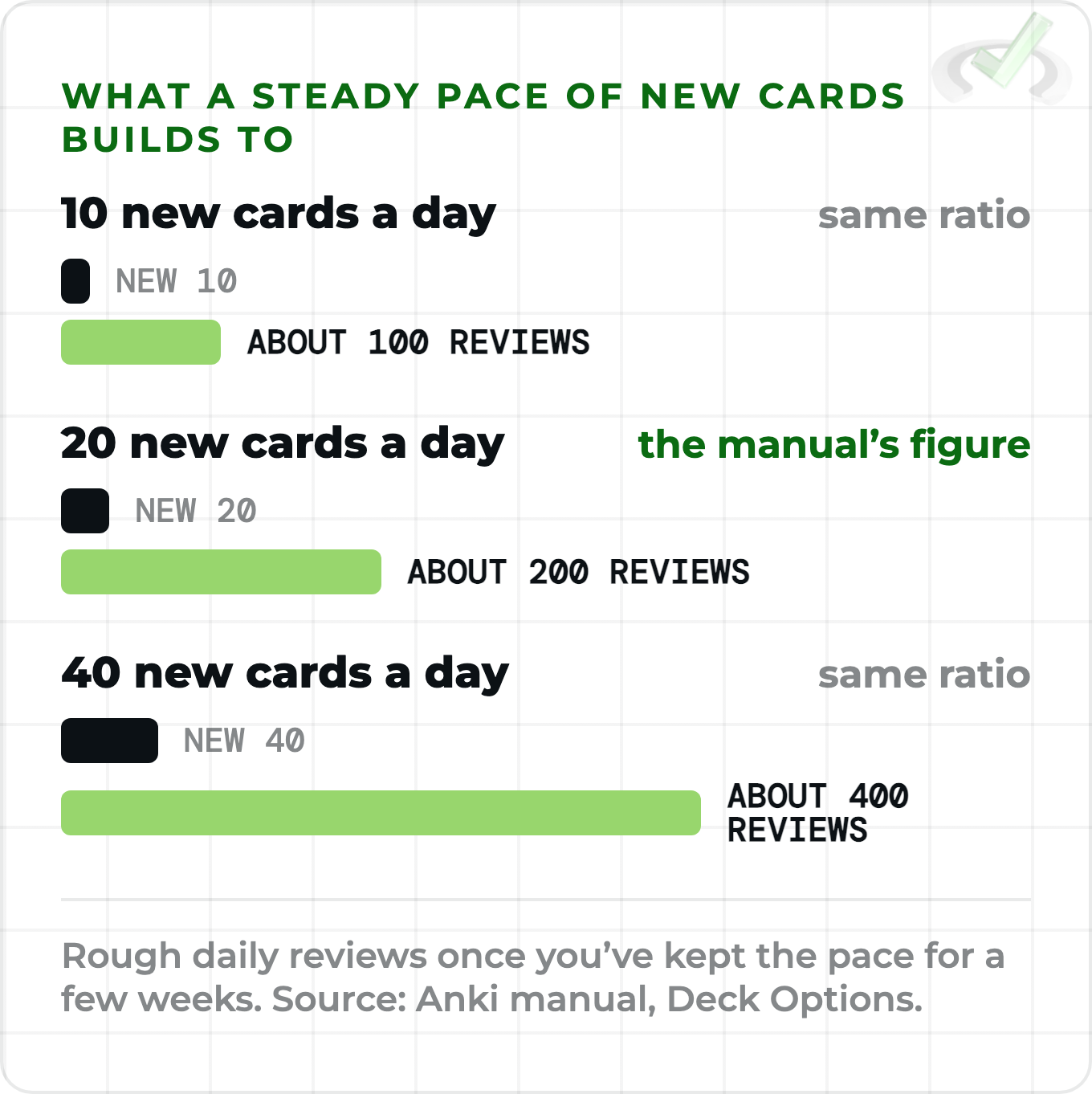
So pick the number of new cards from the review time you can give every day, including busy days. If you make your own cards, the number you add each day is your new-card count, whatever the setting says.
- Start near 20 new a day, Anki’s default, and watch your daily reviews for two or three weeks.
- Add more if the reviews fit easily with your practice passages.
- Add fewer if reviews start eating the time you planned for practice.
Anki’s manual warns about the classic mistake, hundreds of new cards in the first few days followed by a flood of reviews. Plenty of us made it our first week too, so you’re in good company if it happens!
How to Make MCAT Anki Cards That Stick
Arvind’s example is the operon, a topic that turns up in bacterial gene regulation passages. Here’s how he turns a source into a card:
- Pick one clear source. He likes Khan Academy for its plain explanations and diagrams.
- Read a paragraph, then stop. Ask yourself what you got from it. If you’re confused, reread it or try another source.
- Make the card once you understand it. Write it in your own words, never copied from the page.
- Ask a question. “What is an operon, and what controls it?” makes you recall. A card that reads “Operons” with a pasted sentence on the back only asks you to recognize it.
- Link two ideas. The promoter and the operon belong on the same card, since one controls the other.
- Add a picture. Right-click an image online, choose Copy Image and paste it into the back of the card.
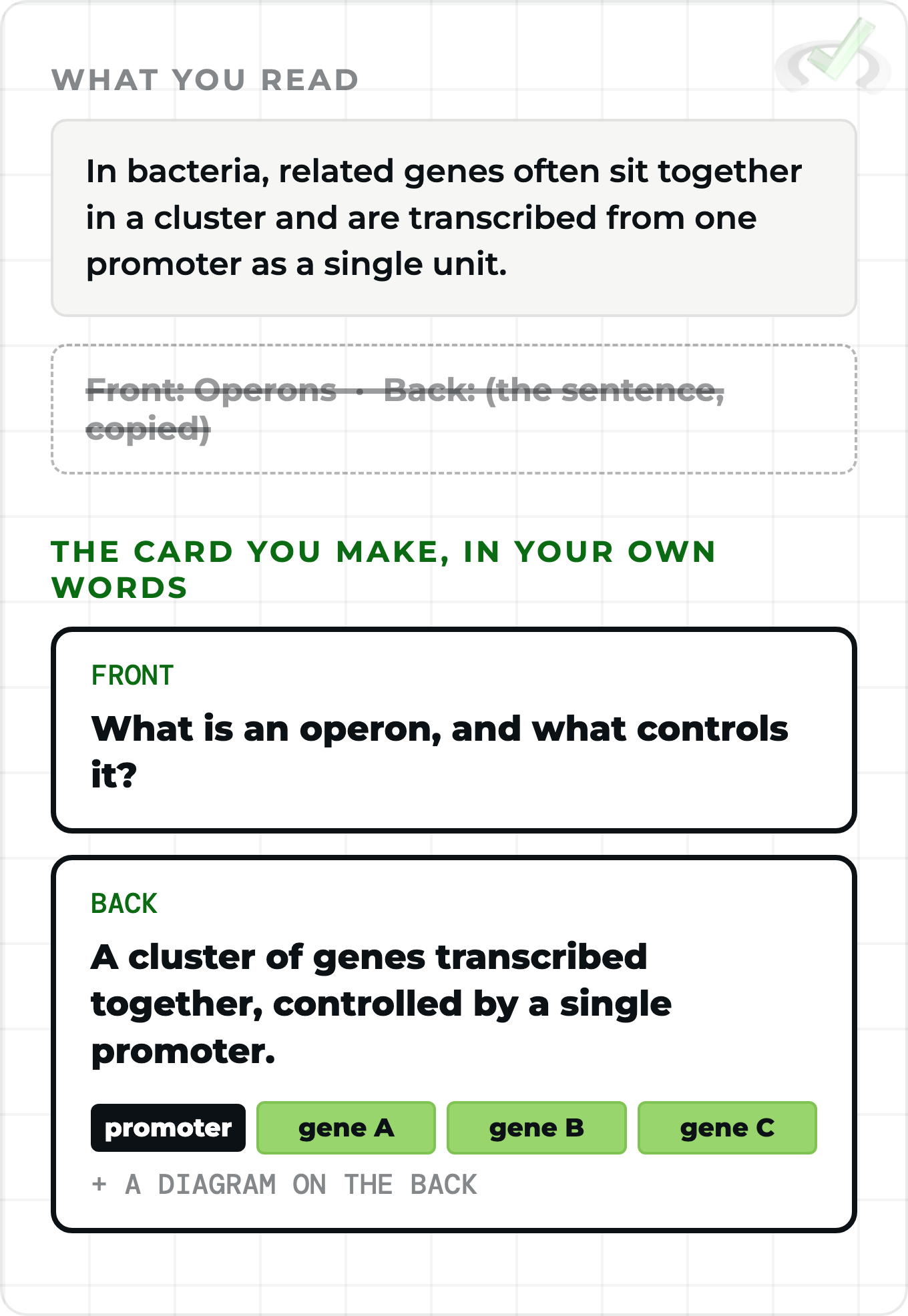
The picture helps for a reason you’ll meet in Psych/Soc. Dual-coding theory holds that we store information both as words and as images, so a card with both gives you two ways back to the answer.
When the card’s ready, press Ctrl+Enter (Cmd+Enter on a Mac) to add it, and the next blank card opens. Click Study Now on your deck to see it the way you will on review days. Your first MCAT Anki card is done!
(Optional) If you’d like a 515+ scorer to look at how you’re studying a section, our 1:1 MCAT tutoring pairs you with one. Let us know if you’d like that!
Which MCAT Anki Card Type Should You Use?
Anki gives you three card types for the MCAT. Pick by what you’re trying to remember:
Arvind sticks to Basic for most MCAT Anki cards. Image Occlusion has been built into Anki since version 23.10, so the add-on code from the video isn’t needed anymore. It sits in the same Type list as Basic, one less thing to install!
Image Occlusion for MCAT Diagrams and Tables
Image Occlusion lets you block out parts of a diagram and quiz yourself on each one. Arvind uses it on glycolysis, covering each molecule in the pathway. Here’s how to make one:
- Copy a diagram. Search for a simple glycolysis diagram, right-click it and choose Copy Image.
- Open the Add screen. Choose Image Occlusion under Type, then Paste image from clipboard.
- Draw a rectangle over each part to hide. Ellipses and polygons work too.
- Pick a mode and click Add. Anki makes one card for each shape.
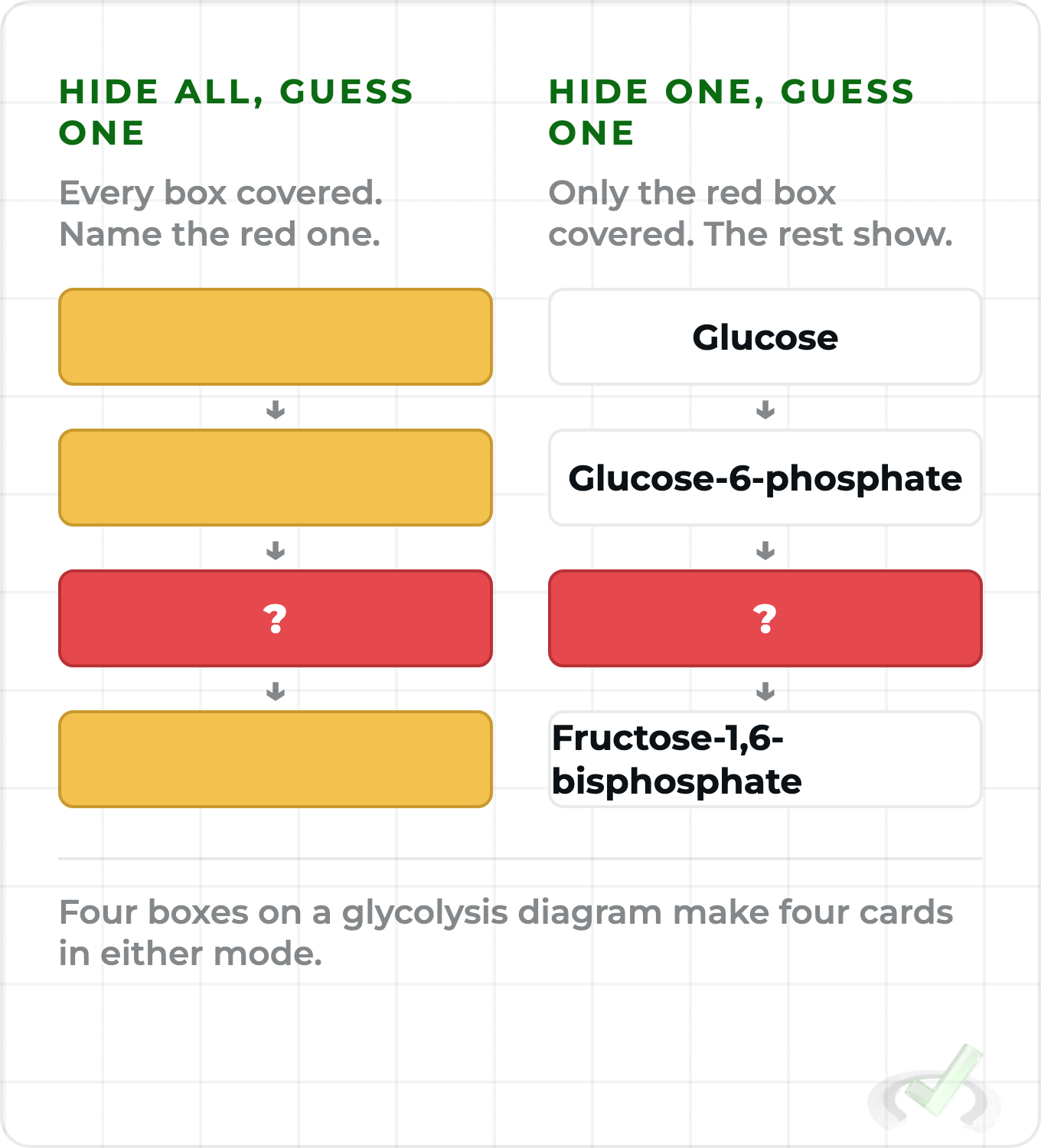
Arvind picks Hide All, Guess One. With every other box covered, you can’t work out the hidden step from the ones around it, so you have to know it.
Tables work the same way. He found it helpful for Psych/Soc, covering the rows of a table of developmental stages one at a time.
Aly took flashcards even further and scored a 132 on Psych/Soc! You can read how she studied psych/soc with flashcards.
Image Occlusion for diagrams and tables, and Basic cards for everything else. Two card types are plenty for the whole MCAT!
How to Rate Your MCAT Anki Cards
After you flip a card, Anki shows four buttons, and your choice sets when you’ll see the card next. Each button shows that next gap above it.
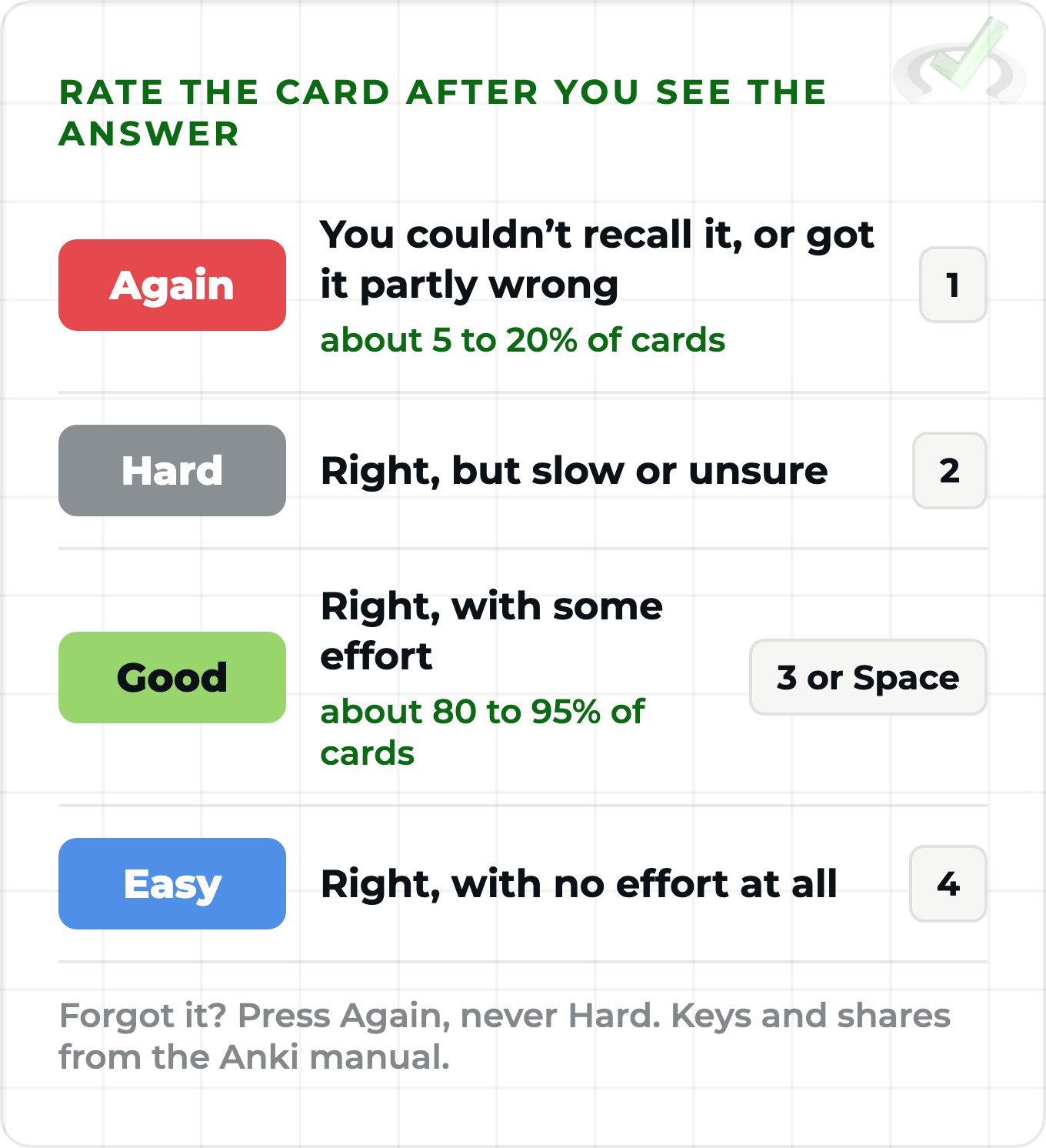
Anki’s manual expects Good on about 80 to 95% of cards and Again on about 5 to 20%. If you’d rather keep it simple, the manual says two buttons are fine too, Again when you’re wrong and Good when you’re right. Whatever keeps you reviewing!
On a new card with the default steps, Again shows it again in about a minute, and Good moves it on to 10 minutes and then the next day. Each time you get it right after that, the gap grows.
Be strict about Again. Partly right counts as wrong, and the manual says pressing Hard on a card you forgot pushes its gaps too far out, especially with FSRS. The studying manual covers every button.
Hard means you got it right with effort. If the answer didn’t come, press Again (key 1), so the card comes back soon :)
Using MCAT Anki With Videos and Practice Questions
Videos work the same way. Watch a part, ask yourself a question about it and make the card. The only change is the picture, since you can’t copy an image out of a video, so you take a screenshot.
Arvind’s MCAT Anki example here is tonicity. In a hypotonic solution, water flows into the cell, so the cell swells and can burst. In a hypertonic one, water flows out and the cell shrinks.
A screenshot of the labeled cells goes on the back of each card. Pictures help a ton for this one!
- Windows. Press Windows key + Shift + S to open the Snipping Tool, then copy the snip and paste it into your card.
- Mac. Press Control + Shift + Command + 4 and drag over the area. The screenshot goes to your clipboard, ready to paste.
The same trick works on practice questions. Screenshot a question you missed, paste it into a card and ask yourself the idea it tested. Your misses turn into cards you’ll see again!
Get The Ultimate MCAT Anki Toolkit
On its way.
Check your inbox in the next minute.
Is Anki Enough for MCAT Content Review?
Anki keeps facts in your head, and that’s a big part of the material you need to know for the exam. The MCAT tests those facts through passages and experiments, though, so you still need practice applying them.
For Arvind, Anki freed up time for that practice, and it can do the same for you!
His top strategies for MCAT Bio/Biochem show what that time went into, from reading experiments to working through the section’s hardest passages. Our guide to remembering what you study covers the memory side in more depth.
Once you’ve got a month or two of content review behind you, our 6-Week Live MCAT Accelerator picks up there.
Phase 2 turns the content you’ve memorized into application, with logic-first strategies for experiments and figures, taught live by a 520+ scorer. We’d love to help!
Keep your daily reviews going, and give the rest of your study time to practice passages. The two work best together!
MCAT Anki FAQs
How many Anki cards a day should I do for the MCAT?
Start near 20 new cards a day, which settles at roughly 200 reviews a day by Anki’s manual. Raise or lower it by how much review time you can give every day.
Is Anki worth it for the MCAT?
Yes, if you review every day! Spaced repetition keeps early chapters fresh while you learn new ones, and Arvind credits his MCAT Anki habit for his jump from 499 to 517.
Should I use a premade MCAT Anki deck or make my own?
Either works! Making your own cards takes longer and makes you understand each idea first, the way Arvind did.
A premade MCAT Anki deck saves that time, and our best MCAT Anki decks guide compares them. With a big premade deck, the new cards/day setting sets your pace.
Can I use Anki on my phone?
Yes. AnkiDroid for Android is free, AnkiMobile is the official iPhone app and costs money, and AnkiWeb syncs your cards between devices for free (apps.ankiweb.net). For more card options, see our MCAT flashcards guide.
Do I need any Anki add-ons?
Not to start. Image Occlusion is built in now. Add-ons live under Tools, Add-ons, Get Add-ons, and the add-ons manual warns that an Anki update can break an older add-on.
Learning everything for the MCAT is a lot, and you don’t have to figure out how to remember it alone! Set up your deck today, make your first few cards, and let Anki handle the timing while you keep preparing for the MCAT.
If you’d like help turning what you remember into points, our 6-Week Live MCAT Accelerator pairs 12 live strategy classes with seven 60-minute 1:1 sessions with a 515+ scorer.
If the cohort dates don’t line up, 1:1 MCAT tutoring works around your schedule. You’ve got this :)
You got this,
The MedLife Mastery Team
Your MCAT Success Mentors

 To help you achieve your goal MCAT score, we take turns hosting these